
Skip to content
All feature categoriesFrom key drop to closeout

Repair Workflow

Keep the customer, vehicle, technician evidence, pricing, authorization, and job status connected from arrival to pickup.

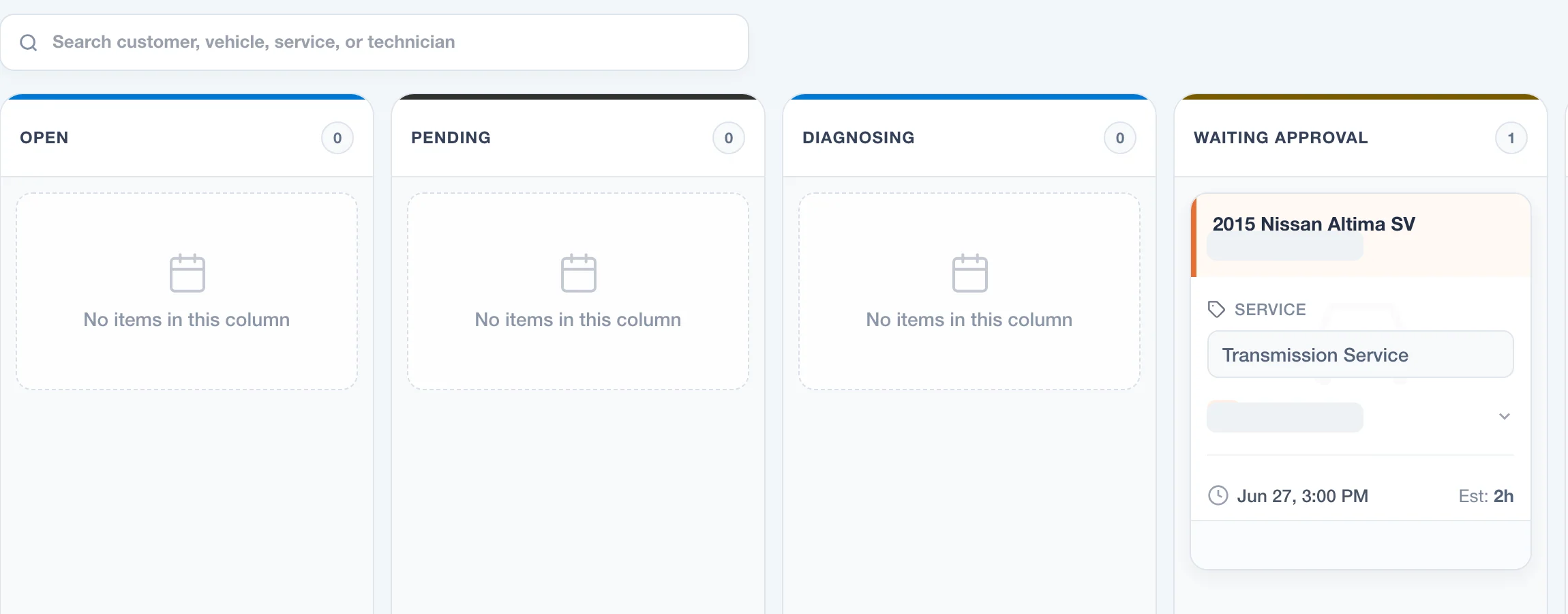
Current WrenchDay repair-order board with identifying names removed
Current repair-order workflow with identifying demo fields removed
Included in this category

One page. The complete workflow.

Run the full repair path from intake through authorization and final check without rebuilding the job at every handoff.

01Vehicle Intake

Customer Check-In

Check in scheduled arrivals or walk-ins with customer, vehicle, concern, authorization, assignment, and condition photos in one guided flow.

  • Scheduled-arrival and walk-in intake
  • Customer, vehicle, concern, authorization, and mechanic assignment
  • Configurable vehicle-condition photo capture

02Vehicle Intake

VIN Decoding

Speed up vehicle intake by capturing better vehicle details early in the workflow.

  • VIN decoding support
  • Vehicle profile enrichment
  • Intake workflow alignment
03Shop Operations

Digital Repair Orders

One live work jacket for intake, diagnosis, photos, inspections, estimates, approvals, invoice handoff, and closeout.

  • Stage tracking from intake through completion
  • Customer, vehicle, advisor, mechanic, and service notes together
  • Estimate, inspection, media, and invoice context attached to the job
04Shop Operations

Repair Order Kanban Board

See every active job by status so advisors and technicians know what is waiting, authorized, in progress, and ready for closeout.

  • Status columns for active repair orders
  • Repair-order cards with customer, vehicle, and workflow context
  • Fast movement into the job detail screen
05Estimate Drafting

AI Diagnostic and Estimate Assistance

Turn rough mechanic notes into cleaner estimate language without making advisors start from a blank page.

  • Draft estimate language from shop notes
  • Support for diagnostic and service explanations
  • Review-first workflow for advisor control
06Service Guidance

Labor Guide Assistance

Use vehicle and service context to help advisors draft labor guidance without replacing shop judgment.

  • Labor guidance from repair-order and vehicle context
  • Advisor review before estimate use
  • Works alongside AI estimate assistance
07Repeatable Services

Canned Jobs

Save common work packages so advisors can quote routine services quickly and consistently.

  • Reusable service packages
  • Consistent labor and parts structure
  • Simple starting point for new estimates
08Vehicle Evidence

Digital Vehicle Inspections with Photos

Keep inspection checkpoints, technician notes, and vehicle photos attached to the repair order.

  • Guided inspection checkpoints
  • Photos and notes attached to findings
  • Findings can support estimate recommendations
09Customer Authorization

Digital Estimates and Customer Approvals

Build clear estimates and send approval links customers can review from their phone.

  • Line-item estimates with parts and labor
  • Public approval links for customer review
  • Approval state visible on the repair order
10Customer Authorization

Electronic Signatures

Capture customer authorization with a signed intake or approval record before inspection or repair work moves forward.

  • Typed and drawn signature support on customer authorization pages
  • Pending and approved authorization queues
  • Authorization records attached to repair orders
11Closeout Control

Quality Control and Final Check

Move completed repair work through a final-check step before invoice, pickup, and closure.

  • Final Check status support in the repair-order workflow
  • Quality-control handoff before invoice and pickup
  • Completion signals tied to approved repair work
12Vehicle Data

Vehicle Recall Information

Check recall context from the saved VIN so advisors can see campaign information while reviewing the repair order.

  • VIN-based recall lookup
  • Decode-state handling when vehicle data is incomplete
  • Repair-order context for service advisors

The shop is running.You don't have to be there.

See the work, the team, and the money from anywhere.

Start your 14-day trial

One plan. No contract. Cancel anytime.

WrenchDay shop owner illustration