
Skip to content
All feature categoriesControl the money around the job

Parts, Payments & Reporting

Bring supplier records, purchasing, invoicing, payment status, accounting, and owner reporting into a more traceable flow.

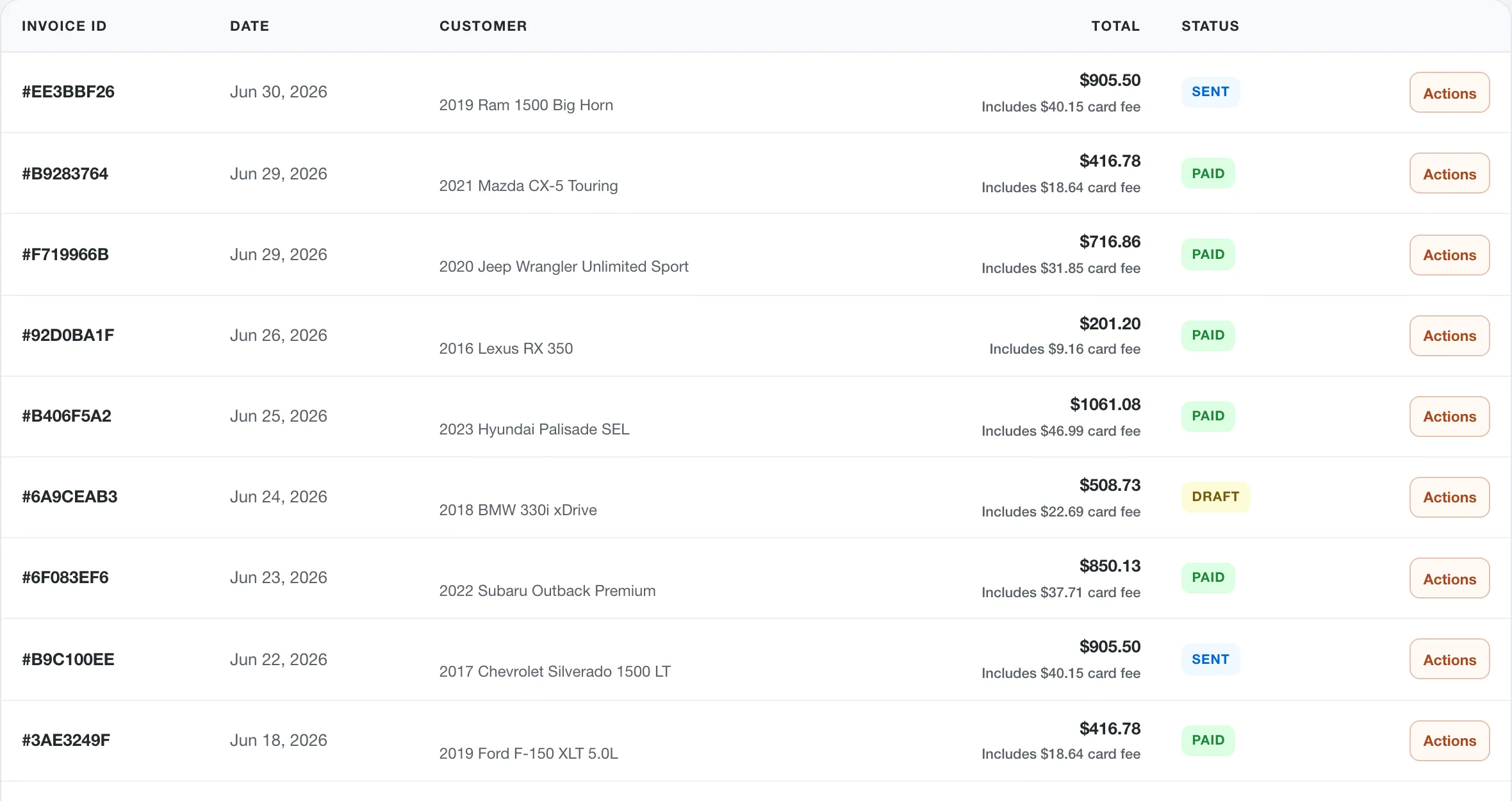
Current WrenchDay invoice workflow with identifying customer names removed
Current invoice and payment workflow with identifying names removed
Included in this category

One page. The complete workflow.

Manage the parts and financial work around each repair, from purchase orders through payment and reporting.

01Parts Operations

Parts and Inventory Management

Track stocked parts, suppliers, mechanic requests, purchase orders, receiving, and core returns in one operational workspace.

  • Inventory and supplier records
  • Mechanic part requests
  • Purchase orders, receiving, and core returns
02Purchasing Workflow

Supplier Records

Keep supplier records, purchase orders, receiving, bills, and core credits organized around inventory work.

  • Supplier records
  • Purchase orders and receiving
  • Bills and core-credit context
03Inventory Control

Purchase Orders and Suppliers

Track parts purchasing so ordered items, received items, and job usage stay easier to reconcile.

  • Supplier and purchase-order records
  • Receiving workflow support
  • Connection to inventory operations
04Parts Accountability

Core Returns

Track core-return activity so refundable parts do not disappear after the job is done.

  • Core-return tracking
  • Inventory and supplier context
  • Cleaner follow-up on refundable parts
05Closeout

Invoicing

Create customer invoices from completed work and keep payment status connected to the job.

  • Invoice creation from shop work
  • Customer-facing invoice links
  • Payment status and sync context
06Payment Links

Invoicing and Payments

Let customers pay invoices online through secure public payment links.

  • Public invoice payment links
  • Card and wallet payment support where available
  • Payment status tied to invoices
07Accounting

QuickBooks Integration

Move invoices, payments, and accounting context toward QuickBooks without duplicate entry.

  • QuickBooks connection flow
  • Invoice and payment sync context
  • Less duplicate entry after closeout
08Accounting

Built-in Accounting

Manage basic ledgers, expenses, and shop financials directly inside WrenchDay without needing external software.

  • Track revenue and expenses
  • Basic ledger for shop financials
  • No mandatory third-party software required
09Owner Visibility

Shop Reporting and Analytics

Give owners a dashboard read on revenue, active work, appointments, approvals, invoices, and payment status.

  • Revenue and payment context
  • Appointments, repair orders, and approvals
  • Shortcuts into the work needing attention

The shop is running.You don't have to be there.

See the work, the team, and the money from anywhere.

Start your 14-day trial

One plan. No contract. Cancel anytime.

WrenchDay shop owner illustration